Choosing the Right Aquarium Controller for Your Setup:
Neptune Apex Aquarium Controllers:
Neptune’s Apex line offers a modular, high-performance solution for serious reef keepers. Monitor temperature, pH, salinity, and ORP while automating lighting, dosing, feeding, and more through the Apex Fusion app. The system is fully expandable and integrates seamlessly with Neptune add-ons like the Trident, DOS, and AFS.
Hydros Aquarium Controllers:
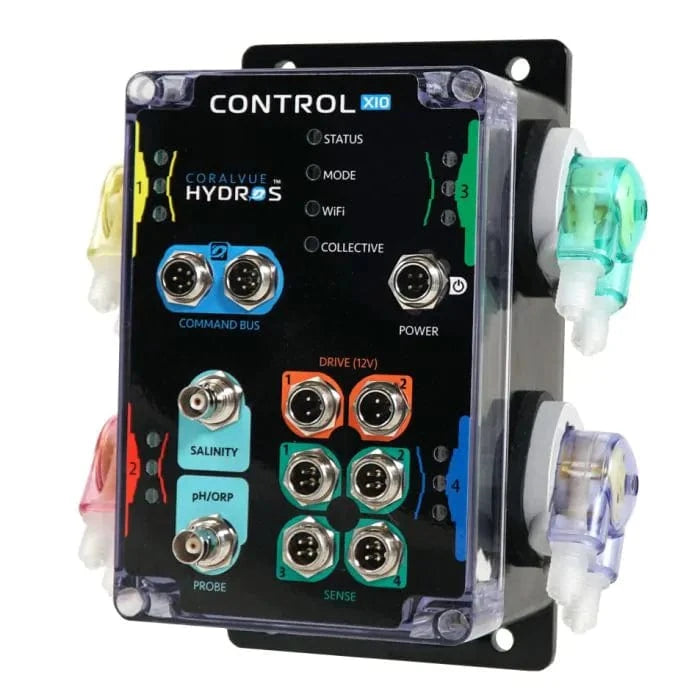
Hydros controllers are known for their versatility, durability, and ease of use. With an IP65 waterproof rating, built-in WiFi, and a mobile-first interface, Hydros offers a plug-and-play alternative to traditional controller ecosystems. Options range from entry-level (like the Control X2) to fully scalable systems like the Control X10.
Apex Jr and Entry-Level Hydros Units:
Perfect for hobbyists who want basic monitoring without the complexity of a full system. These compact units can handle essentials like temperature control, equipment scheduling, and leak detection — and can be expanded over time.
Add-On Modules & Accessories:
From dosing pumps and PAR sensors to leak detectors and flow monitors, aquarium controllers support a range of accessories that grow with your reef. Hydros and Neptune both offer sensor-driven automation that helps prevent equipment failures and improve long-term stability.
Optimizing Aquarium Controller Performance
Start Simple, Scale Over Time:
Both Hydros and Neptune controllers are modular by design. Begin with core functions like temperature control, lighting schedules, and equipment automation — then expand into dosing, leak detection, and water chemistry monitoring as your tank matures.
Set Up Alerts for Critical Parameters:
Whether you're monitoring pH, salinity, temperature, or ORP, be sure to set threshold-based alerts through your controller’s app (Hydros App or Apex Fusion). These instant notifications can help you catch issues like heater failures, pump shutdowns, or chemical imbalances before they impact your livestock.
Use Automation for Routine Stability:
Take advantage of scheduling features to automate common tasks like lighting cycles, ATO operation, or feed pauses. This reduces manual input and keeps your tank environment consistent — especially helpful for coral health and fish feeding behavior.
Pair with Dosing Systems for Hands-Off Supplementation:
Connect your controller to a dosing pump (like the Hydros Doser or Neptune DOS) to automate the delivery of calcium, alkalinity, and magnesium. This ensures more stable levels and frees you from daily manual dosing.
Monitor Data Trends, Not Just Daily Readings:
Use your controller’s built-in logging to track trends in pH, temperature, and salinity over time. Spotting long-term drifts can help you adjust equipment settings or maintenance routines before they lead to problems.
Expert Tips
Label Your Equipment in the App
Once you’ve connected your devices, take a few minutes to label each outlet, sensor, or dosing head in the Hydros App or Apex Fusion dashboard. Clear naming helps avoid mistakes when making changes or troubleshooting.
Use Redundancy Where It Matters
For critical systems like heating or return pumps, set up fail-safes using dual sensors or backup devices. For example, you can program a second heater to kick on only if the primary fails — or trigger an alert if temperature readings don’t match across sensors.
Plan Cable Management Early
Controller setups can get messy fast. Use labeled zip ties, Velcro straps, or cable holders to keep wires tidy and separated by function (power, sensors, dosing lines). This makes future maintenance safer and more organized.
Enable Feed Modes and Maintenance Profiles
Create custom presets that turn off pumps, skimmers, and lighting during feedings or water changes. Both Hydros and Apex allow you to automate these actions at the push of a button, making maintenance cleaner and more efficient.
Keep a Manual Backup for Key Systems
Even with automation, always have manual tools on hand — like a thermometer, power strip, or dosing containers. In case of a controller failure or power outage, you’ll still be able to maintain your system manually.
Installation & Maintenance
Installing Your Aquarium Controller
Hydros Controllers:
Most Hydros units are plug-and-play and can be wall-mounted or placed on a dry, secure surface near your sump or tank. Use the Hydros App to walk through the initial setup process, connect devices wirelessly, and assign sensors or outlets as needed. Make sure to keep all control units above water level and away from splash zones. Magnetic mounts and probe holders are available to help organize sensors neatly in your sump or display.
Neptune Apex Systems:
Start by mounting the Apex base unit and Energy Bar in a well-ventilated, dry area — ideally inside a control cabinet or above your sump. Use AquaBus cables to link expansion modules, and install probes (temperature, pH, salinity) in a low-flow section of your sump using probe holders. Once connected, complete setup through the Apex Fusion dashboard. Be sure to label outlets and assign fail-safes early in the process.
Dosing Pumps and Sensors:
Whether you’re using Hydros or Neptune dosing accessories, mount them securely above your dosing containers to prevent back-siphoning. Run dosing lines cleanly using clips or holders, and label each line for quick reference. Leak detectors, flow sensors, and float switches should be placed according to manufacturer guidelines — typically in high-risk areas like under the sump or around ATO reservoirs.
Maintenance Tips for Aquarium Controllers
- Clean Probes Monthly: Use only the recommended calibration and cleaning solutions for pH, salinity, and ORP probes. Never use tap water or abrasives.
- Check Cables and Connections: Inspect AquaBus, 1LINK, and sense port cables for corrosion or looseness. Reroute any that are exposed to splash zones or strain.
- Dust & Wipe Down Equipment: Salt creep and dust can build up over time. Wipe down control units, Energy Bars, and mounting brackets monthly to maintain airflow and prevent overheating.
- Test Alerts and Backup Systems: Run periodic checks on alarms, leak detectors, and emergency power settings to make sure your safeguards are functioning properly.
Keep Firmware Up to Date: Check for updates in the Hydros App or Apex Fusion and apply new firmware versions to unlock features and ensure compatibility with new accessories.